|  Printing in TRichView Printing in TRichView | |
 Printing with Preview Printing with Preview
TRichView documents can be printed – with all images, backgrounds, tables, etc.
A special component ( TRVPrintPreview) displays a page preview on the screen.
Users can browse pages, zoom in and zoom out of this preview. TRVPrintPreview) displays a page preview on the screen.
Users can browse pages, zoom in and zoom out of this preview.
Users can define page breaks at any place in the document.

Printing Inserted Components
TRichView tries to print inserted controls itself.
But it is not possible to create a procedure for printing any type of controls.
If you are not satisfied with the default printing, you can use OnPrintComponent to print controls yourself (by drawing them in a temporary bitmap).
TRichView has special support for printing TChart components. Details are in Resources for TRichView.
Page Headers and Footers
You can assign other documents as headers and footers. The component supports different headers and footers for the first page and for odd and even pages.
Alternatively, headers and footers can be drawn in OnPagePrepaint or OnPagePostpaint events.
This method is used in RichViewActions: they draw plain text headers and footers containing fields (page number, page count, date and time).
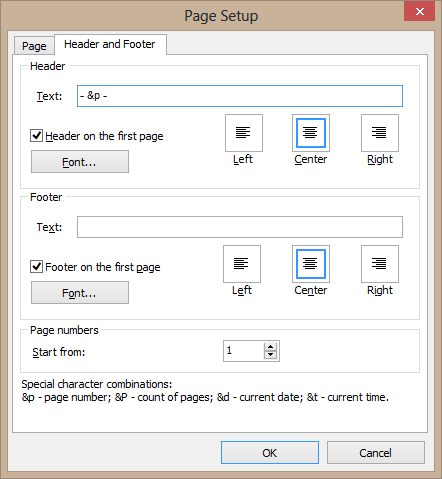
“Page setup” dialog in RichViewActions allows defining plain text headers and footers
Additional information about printing headers and footers
Advanced Possibilities
 TRVReportHelper component can draw documents at the specified rectangle of any Canvas, including printer's Canvas. TRVReportHelper component can draw documents at the specified rectangle of any Canvas, including printer's Canvas.
This component allows implementing complex page layouts, for example printing documents in several columns.
Demos
- Editing and printing:
Demos\*\Editors\Editor 1\
- Printing with a simple header (“Page M of N”):
Demos\*\Assorted\Printing\Printing\
- Loading RTF documents and printing them with header and footer:
Demos\*\Assorted\Printing\Headers\
- Printing with TRVReportHelper:
Demos\*\Assorted\Printing\ReportHelper\
- High quality printing of documents with TChart:
Demos\Addins\ChartItem\
Tips and tricks about printing
WYSIWYG Editing
WYSIWYG editing is not supported in TRichView. Line wrapping on the screen and on the paper may be different.
WYSIWYG mode is implemented in ScaleRichView (additional components to TRichView). It allows editing the main documents, all headers, footers, footnotes, endnotes and text boxes in a single component.
|