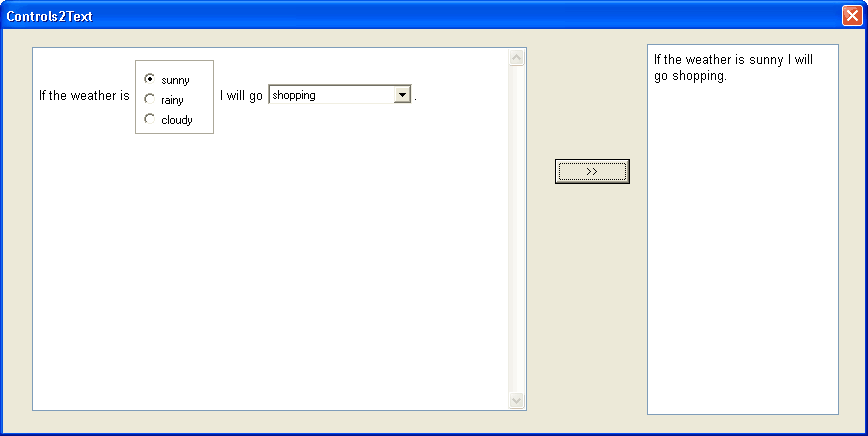
[Demo] Replacing controls with text
-
Sergey Tkachenko
- Site Admin
- Posts: 17310
- Joined: Sat Aug 27, 2005 10:28 am
- Contact:
[Demo] Replacing controls with text
Last edited by Sergey Tkachenko on Sat Oct 01, 2011 9:18 am, edited 2 times in total.
-
Sergey Tkachenko
- Site Admin
- Posts: 17310
- Joined: Sat Aug 27, 2005 10:28 am
- Contact:
Similar code can be used to change controls to images.
In this code, GetControlGraphic is your function returning graphic representation of the given control. You can use DrawControl function from CtrlImg unit, but it is not able to create images for all types of controls.
Updates
2008-Dec-11: for compatibility with TRichView 11
2011-Oct-1: for compatibility with TRichView 13.4
In this code, GetControlGraphic is your function returning graphic representation of the given control. You can use DrawControl function from CtrlImg unit, but it is not able to create images for all types of controls.
Code: Select all
{ Inserting graphic item in RVData at the ItemNo position }
{ some undocumented functions are used }
procedure InsertGraphicItem(RVData: TCustomRVData; ItemNo: Integer;
  ItemName: TRVRawByteString; gr: TGraphic; VAlign: TRVVAlign;
  PageBreak, NewLine, NewPara: Boolean);
var Item: TRVGraphicItemInfo;
begin
  Item := TRVGraphicItemInfo.CreateEx(RVData, gr, VAlign);
  Item.SameAsPrev := not NewPara;
  if NewLine and not NewPara then
    Item.BR := True;
  if PageBreak then
    Item.PageBreakBefore := True;
  Item.Inserting(RVData, ItemName, False);
  RVData.Items.InsertObject(ItemNo, ItemName, Item);
  Item.Inserted(RVData, ItemNo);
end;
Code: Select all
{ Changes all controls in RVData (and its sub-data) to their graphic
  representations }
procedure ControlsToGraphics(RVData: TCustomRVData);
var i,r,c: Integer;
    Control: TControl;
    ControlName: TRVAnsiString;
    ControlTag: TRVTag;
    ControlVAlign: TRVVAlign;
    table: TRVTableItemInfo;
    PageBreak, NewLine, NewPara: Boolean;
    Graphic: TBitmap;
begin
  for i := 0 to RVData.ItemCount-1 do
    case RVData.GetItemStyle(i) of
      rvsTable:
        begin
          table := TRVTableItemInfo(RVData.GetItem(i));
          for r := 0 to table.Rows.Count-1 do
            for c := 0 to table.Rows[r].Count-1 do
              if table.Cells[r,c]<>nil then
                ControlsToGraphics(table.Cells[r,c].GetRVData);

        end;
      rvsComponent:
        begin
          RVData.GetControlInfo(i, ControlName, Control, ControlVAlign, ControlTag);
          Graphic := GetControlGraphic(Control);
          PageBreak := RVData.PageBreaksBeforeItems[i];
          NewLine := RVData.IsFromNewLine(i);
          NewPara := RVData.IsParaStart(i);
          RVData.DeleteItems(i, 1);
          // you can copy tag as well
          InsertGraphicItem(RVData, i, ControlName, Graphic, ControlVAlign,
            PageBreak, NewLine, NewPara);
        end;
    end;
end;2008-Dec-11: for compatibility with TRichView 11
2011-Oct-1: for compatibility with TRichView 13.4