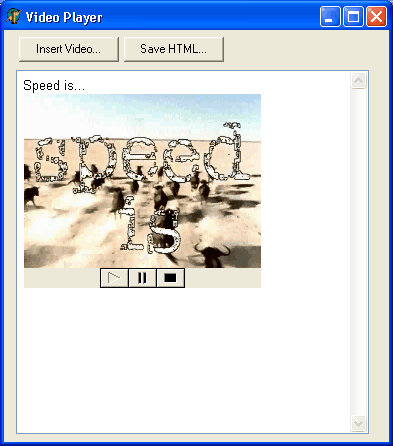
This demo shows:
- how to play AVI files in editor using TPanel and TMediaPlayer
- how to implement resizing of AVI players
- how to export documents containing AVI players to HTML
- how to allow saving and loading documents containing AVI players in RVF
2008-Dec-9: updated according to suggestions below:
- OnItemAction is used to reassign Display;
- hint with file name;
- Rewind button is shown instead of Stop
2018-Apr-8: compatibility with TRichView 17.3
Could something be done about this avi procedures? It doesn't seem to work within a table. I tried to figure out but its a very painstaking effort. Need someting less time-consuming.
Sorry for being very brief. Within a table, the resize caused an error. If clicked anywhere other then the panel itself (even outside the table), the resize-procedure is activated thus causing an error. Only when the actual resizing is preformed should the resize-procedure be activated. Could you please check this for me.
procedure TForm1.RichViewEdit1ItemAction(Sender: TCustomRichView;
  ItemAction: TRVItemAction; Item: TCustomRVItemInfo; var Text: String;
  RVData: TCustomRVData);
var Panel, VideoPanel: TPanel;
    Player: TMediaPlayer;
begin
  if csDestroying in Sender.ComponentState then
    exit;
  if (ItemAction=rviaInserted) and (Item.StyleNo=rvsComponent) and
    (TRVControlItemInfo(Item).Control is TPanel) then begin
    Panel      := TRVControlItemInfo(Item).Control as TPanel;
    VideoPanel := Panel.Components[0] as TPanel;
    Player     := Panel.Components[1] as TMediaPlayer;
    Player.Display := VideoPanel;
  end;
end;
One more suggestion: I just noticed that the TMediaPlayer's Stop button does not reset the movie position to the beginning (so I do not understand what's the difference between Stop and Pause buttons), so hiding additional buttons may be undesirable.
For the player button (namely stop button), I have to reset the position using on notify event - this is one of the incomplete thing in TMediaPlayer. The event is available in the player itself.
Can we have embedded Windows Media Player control
like TMediaPlayer ? TMediaPlayer also is build on Windows
control, but I want to see original buttons, trackbar, and so on.
We often see this embedded players on websites.
Create Windows Mediaplayer ActiveX: "Component | Import ActiveX Control", select "Windows Media Player (Version 1.0)", and install it. New control (TWindowsMediaPlayer) will be available in the Component Palette, the page "ActiveX".
Video file name can be specified in URL property. I did not try to insert it in TRichView, but I do not think that there will be problems. It even simpler than the example above, because the control includes both video screen and VCR buttons.
I think it can be done only by creating inherited component with new property, containing media data.
It's something that was done for the Flash ActiveX here: http://www.trichview.com/forums/viewtopic.php?t=72