trichview.com Forum Index trichview.com
TRichView support forums
 
 FAQFAQ   SearchSearch   MemberlistMemberlist   UsergroupsUsergroups   RegisterRegister 
 ProfileProfile   Log in to check your private messagesLog in to check your private messages   Log inLog in 

[Demo] Dual editor for translators

 
Post new topic   Reply to topic    trichview.com Forum Index -> Examples, Demos
View previous topic :: View next topic  
Author Message
Sergey Tkachenko
Site Admin


Joined: 27 Aug 2005
Posts: 6576

PostPosted: Tue Sep 06, 2005 5:26 pm    Post subject: [Demo] Dual editor for translators Reply with quote

Demo:
http://www.trichview.com/support/files/dualeditor.zip

A helper for human translators. It has two editors - one for the original text and one for the translated text. This screenshot shows English text and its Russian translation:
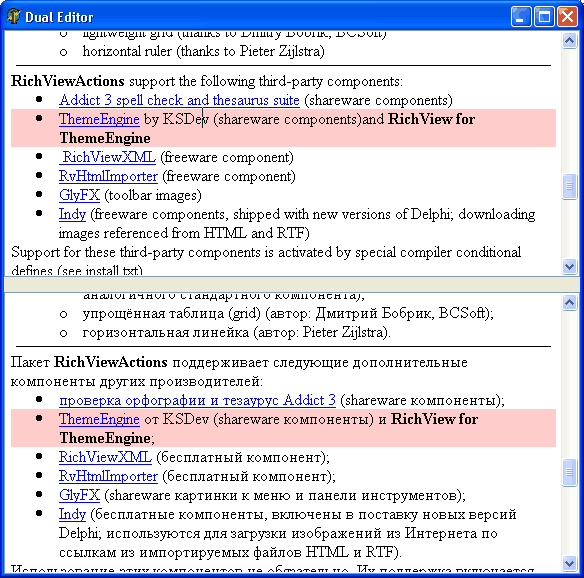

This demo does two things:
1) synchronizes scrolling
2) highlights the currect paragraph in the focused editor, and the corresponding paragraph in another editor.

While (1) is a straightforward procedure, (2) is a kind of trick, because
custom drawing events were not designed for such things, and it slows down editing (because it needs to repaint both editors on each caret movement). If you decide to implement (2) in your application, I recommend to make it optional.
Back to top
View user's profile Send private message Visit poster's website
lkessler


Joined: 01 Sep 2005
Posts: 87
Location: Winnipeg, Manitoba, Canada

PostPosted: Tue Sep 06, 2005 11:36 pm    Post subject: Reply with quote

It would seem to me that this could be used to implement a splitter to divide a RVEdit window into two screens. That's something I will want to implement in the future. However, I will need it to work with tables.

Also, is the Invalidate function "smart" in knowing that it only needs to refresh the screen and not need to reformat?
Back to top
View user's profile Send private message Visit poster's website
Sergey Tkachenko
Site Admin


Joined: 27 Aug 2005
Posts: 6576

PostPosted: Wed Sep 07, 2005 9:52 am    Post subject: Reply with quote

This demo does not modify the second editor, if the text in the first editor is changed. It only highlights paragraph with the same index.
Back to top
View user's profile Send private message Visit poster's website
Nostradamus


Joined: 13 May 2006
Posts: 28

PostPosted: Sat May 13, 2006 2:14 pm    Post subject: Displaying 'Filename' for open document/file Reply with quote

Hello Sergey,

1 How do I display filenames {in a status bar TPanel} in the dualeditor for two open documents?

Would this be done the same way as for Editor 2 in the demos provided?

2 When I do SaveAs,,,

when the dialog window opens .... How do I get the current filename to appear in the window where it asks name of file?

Any help is appreciated

Richard
Back to top
View user's profile Send private message
Sergey Tkachenko
Site Admin


Joined: 27 Aug 2005
Posts: 6576

PostPosted: Mon May 15, 2006 1:45 pm    Post subject: Reply with quote

Yes, do it like in the Editor2 demo.
TRichView does not store names of files, you need to do it yourself (or use RichViewActions)
Back to top
View user's profile Send private message Visit poster's website
Display posts from previous:   
Post new topic   Reply to topic    trichview.com Forum Index -> Examples, Demos All times are GMT
Page 1 of 1

 
Jump to:  
You cannot post new topics in this forum
You cannot reply to topics in this forum
You cannot edit your posts in this forum
You cannot delete your posts in this forum
You cannot vote in polls in this forum


Powered by phpBB © 2001, 2005 phpBB Group