Unit [VCL/FMX]: RVStyle / fmxRVStyle.
type
TRVTextDrawState = (rvtsSelected, rvtsHover,
rvtsItemStart, rvtsItemEnd,
rvtsDrawItemStart, rvtsDrawItemEnd,
rvtsControlFocused, rvtsSpecialCharacters);
TRVTextDrawStates = set of TRVTextDrawState;
States of text, used for drawing.
See:
•TRVStyle.OnDrawStyleText, OnDrawTextBack;
•TFontInfo.Draw
State |
Meaning |
|---|---|
rvtsSelected |
text is selected (for copying to the Clipboard) |
rvtsHover |
[hyper]text is below a mouse pointer |
rvtsItemStart |
this call of event draws text item from the beginning |
rvtsItemEnd |
this call of event finishes drawing of text item |
rvtsDrawItemStart* |
this call of event draws part of text item (called "drawing item")from the beginning |
rvtsDrawItemEnd* |
this call of event finishes drawing of part of text item. |
rvtsControlFocused |
TRichView has input focus |
rvtsSpecialCharacters |
rvoShowSpecialCharacters is included in TRichView.Options. |
* old versions of the components might draw selection as a part of a string belonging to a drawing item; the new version always draws the whole drawing item, setting the proper clipping region before drawing, so these states can be ignored.
For example
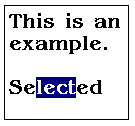
(there are two items: 'This is an example.' and 'Selected',
and three "drawing items": 'This is an', 'example.' and 'Selected'
Calls of TRVStyle.OnDrawStyleText will be:
'This is an' with [rvtsItemStart,rvtsDrawItemStart,rvtsDrawItemEnd]
'example.' with [rvtsItemEnd, rvtsDrawItemStart, rvtsDrawItemEnd]
'Selected' with [rvtsItemStart, rvtsItemEnd, rvtsDrawItemStart, rvtsDrawItemEnd]
'Selected' with [rvtsItemStart, rvtsItemEnd, rvtsDrawItemStart, rvtsDrawItemEnd, rvtsSelected] (a clipping region is set so that only 'lect' is visible).
(Note: in older versions of the components, the last cal was 'lect' with [rvtsSelected]).